
3-Axis Gyro for RC Planes: Compatibility and Setup Checks
The product in this listing is not a ready-to-fly drone. It is a small 3-axis gyro or flight-stabilizer module sold for compatible RC aircraft, including some fixed-wing, delta-wing, V-tail, helicopter, and FPV setups. That makes compatibility—not the promise of easier flying—the first question.
Quick decision
- Consider it if: your aircraft already flies correctly, its manual or wiring clearly supports an external stabilizer, and you understand your receiver and control channels.
- Skip it if: you are buying your first casual drone, cannot identify the receiver outputs, or want a plug-and-play cure for an unstable or damaged model.
- Verify first: airframe type, receiver signal and channel count, supply voltage, connectors, mounting orientation, dimensions, weight, and setup instructions.
Start with the problem the gyro is supposed to solve
A stabilizer senses movement and can command small control corrections. In a suitable RC aircraft, that may make wind disturbances or minor attitude changes easier to manage. It cannot create a safe aircraft from a poor mechanical setup, and it cannot decide whether the model, radio, receiver, and control surfaces were connected correctly.
Before shopping, fly or bench-check the aircraft in its normal configuration. Look for loose hinges, binding linkages, damaged propellers, incorrect center of gravity, weak servos, radio range problems, or an airframe that has not been trimmed. A gyro can mask the symptom long enough to make diagnosis harder. Mechanical and radio problems come first.
Seven compatibility checks before buying
- Identify the actual aircraft layout. Conventional fixed wing, delta wing, V-tail, helicopter, and multirotor control mixes are not interchangeable. A listing that names several types does not prove every firmware mode or airframe is supported.
- Confirm the receiver connection. Check whether the module expects separate PWM channels, a serial signal, or another interface. Compare that with the outputs your receiver actually provides.
- Count the channels you need. Stabilized aileron, elevator, and rudder functions may require specific inputs and outputs. Do not assume a spare receiver port means the full setup will work.
- Match voltage and connectors. The permitted input range, plug type, polarity, and current path must agree with the receiver and servos. A physically fitting plug can still be electrically wrong.
- Measure the mounting space. The module needs a firm, flat position with the stated orientation. Include room for plugs and wires, not just the body of the board.
- Check programming and documentation. Find out how aircraft type, gain, direction, and mode are set. If the current listing does not provide a readable manual or clear wiring diagram, pause before ordering.
- Plan a safe verification process. You need a way to disable propulsion, secure the model, observe every control surface, and reverse an incorrect correction direction before flight.
| What you know now | Best next step | Why |
|---|---|---|
| The model is mechanically sound and the manual names a compatible stabilizer setup | Compare the module’s exact connections and modes | You have a defined problem and a compatibility path |
| The model wanders, vibrates, or will not trim correctly | Diagnose the airframe, balance, servos, propeller, and radio first | A gyro may hide rather than solve the fault |
| You cannot identify the receiver outputs or voltage | Find the receiver and aircraft manuals | Connector shape alone is not enough |
| You want a simple first drone for occasional fun | Choose a complete beginner-oriented model instead | This is an installation component, not a complete aircraft |
Current listing example: TL70-style 3-axis stabilizer
The linked AliExpress listing describes a 3 Axis Gyro Flight Controller TL70 Auto Balance Stabilizer for several RC aircraft layouts. GadgetPickLab has not hands-on tested this exact listing. The broad title should be treated as a starting point for verification, not proof that it supports your receiver, airframe, firmware, or wiring.
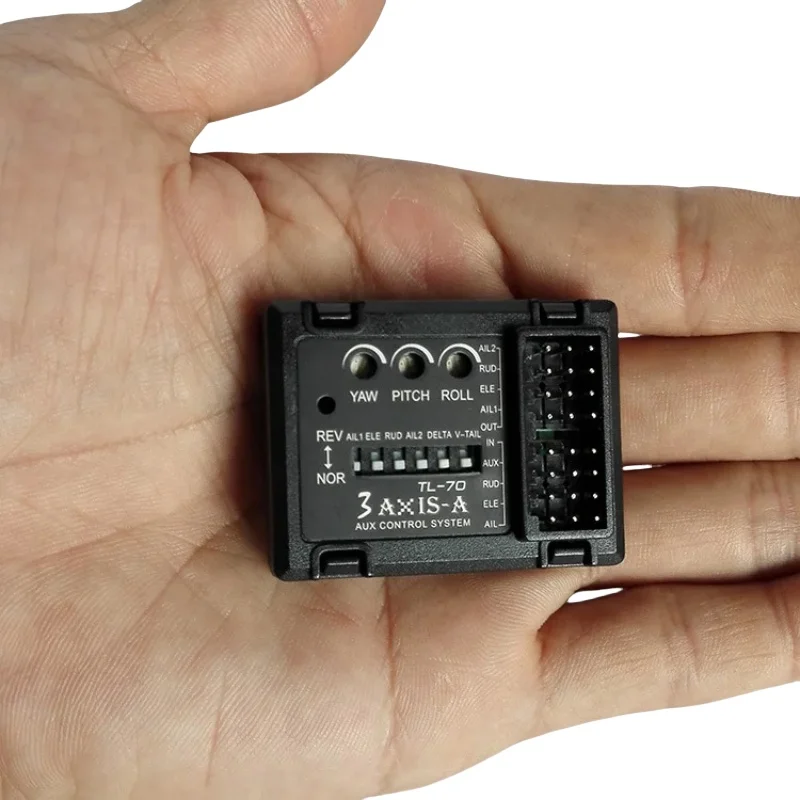
Questions to answer on the live listing
- Is there a readable manual for the exact version being sold?
- Which receiver input type and control-channel layout does it require?
- Which fixed-wing, delta, V-tail, helicopter, or multirotor modes are actually documented?
- What voltage range, plug type, polarity, dimensions, and weight are specified?
- How are gain, direction, and flight mode configured?
- Do recent buyer photos show the same board, labels, and included cables?
Do not order from the title alone. If the listing omits a manual or the seller cannot confirm the exact receiver and aircraft combination, a better-documented stabilizer is the safer comparison.
Bench setup: what must be true before flight
Follow the aircraft, radio, receiver, and stabilizer manuals rather than a generic wiring guess. Work with propulsion safely disabled—removing the propeller where appropriate or following the model manufacturer’s equivalent procedure—and keep the aircraft secured.
- Move each transmitter control and verify the correct surface moves in the correct direction.
- Gently rotate the secured model on each axis and verify the stabilizer’s correction opposes that movement rather than amplifying it.
- Check all configured flight modes, gain settings, endpoints, and fail-safe behavior.
- Inspect wires so they cannot reach a propeller, linkage, hot component, or sharp edge.
- Recheck center of gravity and control-surface movement after installation.
If any response is reversed, intermittent, unexplained, or different from the manual, stop. Do not use a first flight as the place to discover a control-direction error.
Who should skip this part
- A first-time buyer looking for a complete camera drone or simple toy.
- Anyone trying to correct crash damage, a bad center of gravity, binding controls, or unreliable radio gear.
- A user whose receiver, voltage, connectors, or airframe mode cannot be positively identified.
- A very small model that cannot accommodate the module and wiring without affecting balance.
- Anyone without a safe bench-check process or readable setup documentation.
FAQ
Will a 3-axis gyro make an RC plane easy for a beginner to fly?
It may assist a correctly built and configured compatible aircraft, but it does not replace learning the controls or checking the airframe. A complete beginner-oriented model with documented stabilization is usually a clearer starting point.
Are RC gyro stabilizers universal?
No. Airframe layout, receiver outputs, channels, voltage, connectors, mounting direction, programming, and available space can all change compatibility.
Can a gyro fix an aircraft that already flies badly?
Do not use it to hide damage, poor balance, incorrect trim, servo binding, vibration, or radio faults. Diagnose and correct those first.
What is the safest first setup check?
Use the product and radio manuals, disable propulsion safely, secure the model, and confirm every commanded movement and automatic correction direction before attempting flight.
Affiliate disclosure
This article includes one affiliate-linked listing example. GadgetPickLab may earn a commission at no extra cost to you if you buy through the link. The exact product has not been hands-on tested, and compatibility must be confirmed from the current listing and your equipment documentation.