
Power Strip Clutter Under the Desk: What Actually Helps
Quick Answer
If your power strip clutter under the desk is taking up floor space, the easiest fix is to move the strip off the floor and bundle the excess cord path into a simple under desk cable management tray or wall/desk-mounted organizer. A compact setup works best in home offices with limited floor space because it keeps plugs accessible, protects cables, and stops the tangle from spreading.
Who This Is For
This guide is for people setting up or cleaning up a home office where the power strip, charger bricks, and cable slack end up on the floor. It is especially useful if a chair, footrest, printer stand, or storage box leaves very little open space under the desk.
If your goal is a cleaner, easier-to-vacuum workspace, the right setup matters more than buying more accessories. The solution should reduce visible clutter, keep power reachable, and avoid blocking legroom.
Why This Problem Happens
Power strip clutter under the desk usually comes from three things: too many plugs, too much cable length, and no dedicated place to hold the strip. Once cables hang down, they collect dust, get stepped on, and drift into a messy pile.
Limited floor space makes the problem worse. When the strip sits on the floor, every charger brick and extra loop of cable competes with your feet, bins, and chair movement.
Step-by-Step Solution
A good compact setup starts with one simple rule: give the power strip a fixed home above the floor. From there, route only the needed cord length and remove every loose loop you do not use.
- Unplug everything and sort the devices by use.
- Keep only the chargers and power bricks you need nearby.
- Mount or place the power strip under the desk, not on the floor.
- Route cords along the desk edge or leg, then secure slack.
- Leave a clear path for your knees, chair, and vacuum.
- Test access to every plug before tightening the setup.
If you want a cleaner finish, pair this with cable ties, clips, or sleeves. The goal is not to hide every wire; it is to keep the setup orderly and easy to reach.
Quick Comparison Table
| Option | Best for | Watch out for |
|---|---|---|
| Floor strip organizer | Simple setups | Still uses floor space |
| Wall or desk mount | Permanent desk layouts | Needs stable surface |
| Under desk cable tray | Limited floor space | Measure depth first |
| Cable clips and ties | Loose cord control | Does not hold the strip |
Useful Product Types to Consider
For this setup, an under desk cable management tray is one of the most practical product types because it lifts the power strip, charger bricks, and extra cable slack off the floor. That matters in home offices with limited floor space, where every inch under the desk needs to stay usable.
The selected product type, Extendable Under Desk Cable Management No Drilling Metal Cable Tray Space Saving Multipurpose Household Hanging Organizer Shelf, fits the problem well as a category example because it points to the main benefits people need: space-saving storage, a tidy cable path, and no floor pileup. The key is choosing a tray style that matches your desk depth, cable count, and mounting preference.
Below is one product type that may help with this setup. Choose it only if it fits your desk size and daily routine.
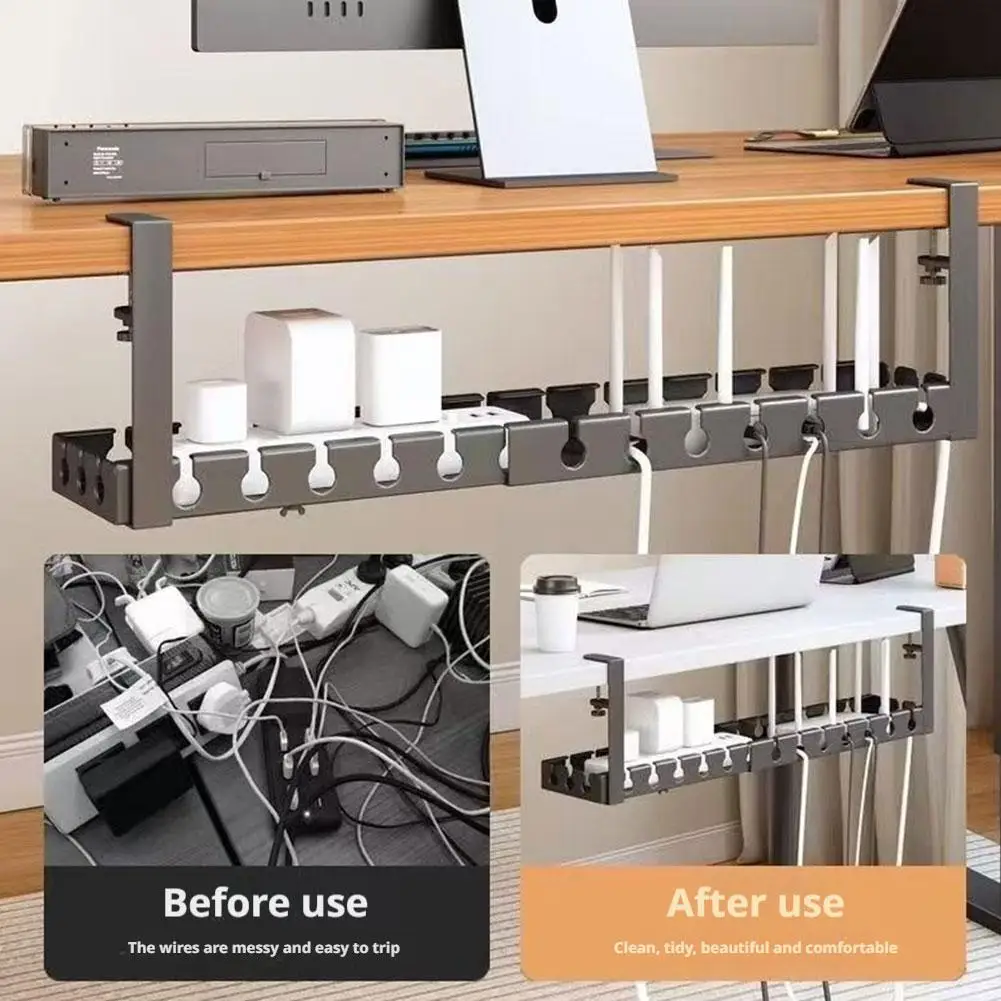
Extendable Under Desk Cable Management No Drilling Metal Cable Tray Space Saving Multipurpose Household Hanging Organiz…
Price: 17.51
Common Mistakes
Leaving the strip on the floor. This is the main reason clutter returns, even after a cleanup.
Buying a tray without measuring. A tray that is too deep or too shallow can block knees or waste space.
Keeping extra cord loops. Slack cables create the visual mess and get caught easily.
Overloading the setup. Too many adapters and bricks can crowd the tray and make access awkward.
Ignoring access to switches. A neat layout still needs fast reach for power controls and unplugging.
FAQ
What is the best way to reduce power strip clutter under the desk?
The best fix is to move the strip off the floor and secure it in a fixed under-desk location. Then shorten visible slack with clips, ties, or a tray so the cables do not spread.
Can a power strip clutter under the desk be solved without drilling?
Yes. Many desks can use no-drill organizers, clamp-style mounts, or adhesive cable accessories. The main requirement is stable support and enough clearance for cords and plugs.
Is an under desk cable management tray worth it for a small home office?
It can be, especially when floor space is limited. A tray keeps the strip elevated, clears walking space, and makes the area easier to clean.
What should I measure before choosing a setup?
Measure desk depth, available clearance from knees to floor, and the size of your power strip and adapters. Also check where the cord needs to exit so nothing bends sharply.
How do I stop cables from becoming messy again?
Use one fixed power strip location, keep only necessary slack, and review the setup when you add a new device. Small maintenance habits prevent the tangle from coming back.
Affiliate Disclosure Note
This article may reference product types that could be available through affiliate links elsewhere on GadgetPickLab. If you choose to buy, it may help support the site at no extra cost to you.