Fineblue F520 Retractable Bluetooth Earpiece: Fit and Call Checks
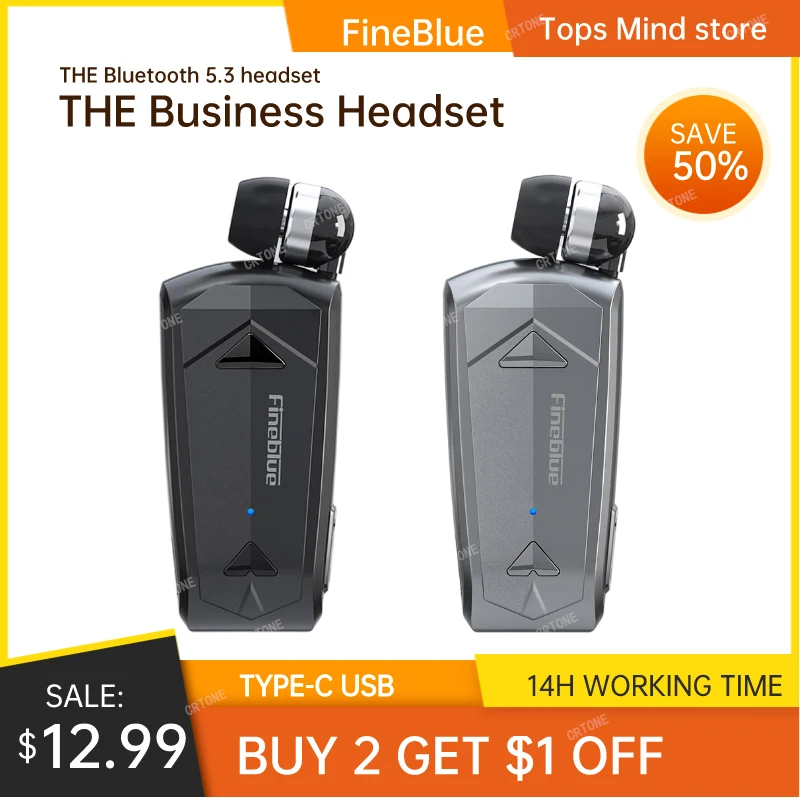
The Fineblue F520 is not a tiny pair of earbuds. It is a clip-on Bluetooth call device with one retractable earpiece and a body that stays on clothing, a bag strap, or another reachable edge. That format can solve the problem of repeatedly removing and storing an earpiece, but only if the clip, cable reach, microphone, alerts, and controls fit the way you actually take calls.
Quick decision
- Consider it if: you take frequent short calls and want one earpiece that retracts into a wearable body.
- Skip it if: you want stereo music, strong noise isolation, two-ear gaming audio, or a device that disappears into a small charging case.
- Verify first: exact model version, supported call functions, prompt language, clip position, retractable cable length, microphone location, controls, charging input, and included parts.
Test the call routine before buying
For one day, take calls with an earpiece you already own or the phone speaker in the places where the F520 would be used. Notice what actually interrupts you: searching a bag, untangling a cable, missing a call, holding the phone, poor microphone position, or discomfort from keeping an earpiece in place.
The F520 format is most relevant when the repeated motion of taking out, wearing, and storing one earpiece is the problem. It does not fix poor mobile signal, a noisy environment, an uncomfortable ear tip, or a job that requires both hands and hearing protection.
How the retractable design changes the tradeoff
| Question | Why it matters | What to check |
|---|---|---|
| Where will the body clip? | The earpiece cable must reach without rubbing or pulling | Clip opening, grip, body weight, clothing thickness, and cable path |
| Where is the microphone? | A body-level microphone may behave differently from one near the mouth | Exact mic location and recent call-quality reports |
| How does the cable retract? | A weak, abrupt, or easily tangled mechanism defeats the point | Pull length, lock positions, return control, and strain relief |
| Which alerts vibrate? | Listing wording may not cover every app or notification | Manual details for calls, messages, apps, and phone operating system |
Eight details to verify on the current listing
- Exact version. Confirm that the selected option is the F520 and not a similar Fineblue model or color-only variation.
- Bluetooth and profiles. The title mentions Bluetooth 5.3, but compatibility depends on the phone and supported call/audio profiles, not the version number alone.
- One-ear format. Make sure the listing includes one retractable earpiece and understand whether audio is mono.
- Clip and cable dimensions. Compare them with the shirt, collar, pocket, or strap where the body would sit.
- Microphone placement. Look for a clear diagram and recent reports from users taking calls in normal environments.
- Buttons and prompts. Check answer, end, volume, redial, assistant, and mute behavior, plus the language of spoken prompts.
- Charging. Confirm the port type, cable included, charging indicator, and whether the device can be used while charging.
- Return and warranty terms. A wearable call device is difficult to judge from specifications alone, so current return conditions matter.
Current listing example: Fineblue F520
The linked AliExpress listing describes a Fineblue F520 mini wireless Bluetooth 5.3 retractable headset with call reminders and vibration. GadgetPickLab has not hands-on tested this exact listing. Treat every function in the title as a claim to verify in the manual, selected variant, and recent buyer reviews.
Questions to answer before ordering
- Does the selected version clearly show the F520 model marking?
- Which call and notification events trigger vibration?
- Where is the microphone, and what do recent call-quality reviews say?
- How long is the earpiece cable, and can it lock at more than one length?
- Which charging port and cable are included?
- Can the prompt language be changed or muted?
Who the F520 format suits—and who should skip it
It may suit: someone who takes several short calls, has a consistent place to clip the body, wants a tactile incoming-call alert, and prefers a single earpiece that cannot be misplaced separately from its wearable base.
Skip it when: the main goal is music quality, two-ear audio, strong isolation, sports security, or the smallest possible pocket carry. A neckband, true-wireless pair, or ordinary headset may fit those needs more directly.
Use and care checks
- Choose a clip position where the body cannot strike machinery, snag on a strap, or pull the earpiece cable across your neck.
- Keep listening volume low enough to remain aware of the environment, and follow local rules for earphone use while driving, cycling, or working.
- Do not share the earpiece without appropriate cleaning, and follow the manufacturer’s instructions for the ear tip and device body.
- Stop using the retractable mechanism if the cable is frayed, kinked, or no longer returns under control.
- Charge with the method specified for the selected device and stop if the battery or housing becomes damaged, swollen, or unusually hot.
FAQ
What is unusual about the Fineblue F520?
It combines a wearable clip, a single retractable earpiece, Bluetooth calling, and advertised vibration alerts instead of using two separate earbuds and a charging case.
Is it mainly for music?
The one-ear clip-on format is better judged as a call and notification tool. Buyers wanting stereo music or strong isolation should compare another product type.
What should I verify before ordering?
Confirm the exact model, Bluetooth and call functions, prompt language, clip and cable dimensions, microphone, controls, charging input, and included parts.
Does the vibration alert work with every app?
Do not assume that. Check the current manual and recent reviews for exactly which calls or notifications trigger vibration on the selected version.
Affiliate disclosure
This article includes one affiliate-linked listing example. GadgetPickLab may earn a commission at no extra cost to you if you buy through the link. The exact F520 has not been hands-on tested, and its fit and functions must be confirmed from the current listing and manufacturer information.